The 3D steel building configurator with live pricing

Let buyers design a carport, metal garage, barn or commercial building on your website and watch the price update from your own price sheets. Every finished design lands in your CRM as a lead with the building attached.

See The Framing

Tube frames, trusses and legs, drawn the way they are built

The frame view shows the legs, trusses, bracing and base rails behind the panels. Buyers see the difference between gauges, leg styles and truss spacing, and your sales team quotes from the same picture.
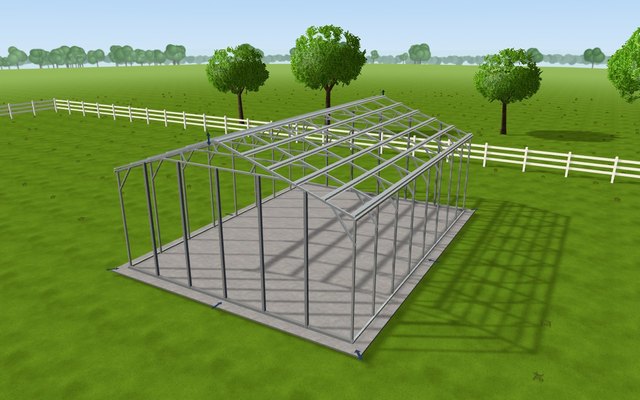
3D tubular steel building frame showing legs, trusses and base rails
Frame view: legs, trusses and bracing
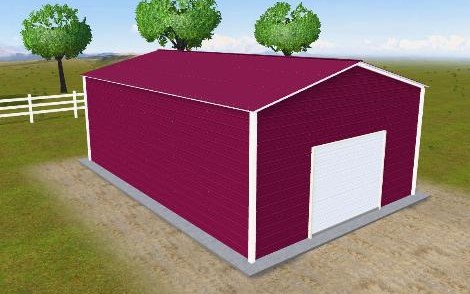
Metal garage designed in the 3D Pro Sales steel building configurator
Finished view: a standard metal garage
What Buyers Choose

Every choice a steel building buyer makes

Building styles

Carports, garages, barns, RV covers, commercial buildings and free-standing lean-tos.

Size and roof

Width, length and leg height, with vertical, boxed eave or regular roofs and a choice of pitch.

Frame

14 or 12 gauge frames, leg styles and truss spacing.

Walls

Open, partial or closed sides and ends, horizontal or vertical panels, and wainscot.

Doors and windows

Roll-up, overhead and walk-in doors, windows and frame-outs on any wall.

Lean-tos

Lean-tos on any side, with wraps and porches.

Colors

Roof, wall, trim and wainscot colors from your own color chart.

Insulation and extras

Insulation, overhangs, cupolas, gutters, concrete and installation extras from your price sheet.

From Design To Deal

What happens after the design

Live pricing from your price sheets

Prices update as the buyer designs, using your own price books, options, certifications and regional rules.

A lead with the building attached

The design, its sizes, options and price arrive in your CRM with the customer’s contact details.

Quotes, contracts and payments

Send the quote, collect an e-signature and take a deposit from the same lead.

Your brand, your website

The configurator runs on your own site with your logo and colors. The leads and data are yours.

One Platform, Three Frame Types

Sell more than one kind of building?

Questions, Answered

Steel building configurator questions

Does the configurator use my prices?

Yes. Prices come from your own price sheets, loaded for your account, not from a generic template.

Can dealers carry more than one manufacturer?

Yes. A dealer can load price books from several manufacturers and choose which one a building is priced from.

What happens when a customer finishes a design?

The design becomes a lead in your CRM with a spec sheet and pictures of the building, and your team can follow up by text, email or phone.

How long does setup take?

Most dealers are live in three to five business days after sending their price sheets.

Do you also support other building types?

Yes. One 3D Pro Sales account covers tubular steel buildings, red iron (pre-engineered) buildings and pole barns. Buyers pick the frame type and the menu changes to match.

Read the full FAQ →
Founding Partner Program: Limited Spots

See your own buildings and your own prices in 3D this month.

Bring one price sheet to the demo and we'll show you a working builder from your actual catalog. 30 minutes, on Zoom, no commitment.

Book Your Demo → Try the 3D Builder

Pick a time on the next page. The calendar invite and Zoom link come to your inbox automatically.